

Root Explorer
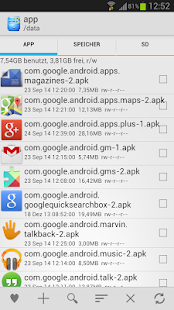
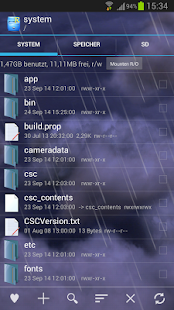
Zugriff auf das gesamte Android-Dateisystem (einschließlich der schwer zugänglichen Datenordnern!).Eigenschaften enthalten multiple Tabs, Google Drive, Box, Dropbox und Netzwerk (SMB) Unterstützung, SQLite Database Viewer, Text Editor, Erstellen und Extrahieren von zip, bzw.
tar/gzip Dateien, Extrahierung von rar Archiven, Mehrfachauswahl, Ausführung von Skripts, Suche, Verbindung, Genehmigungen, Lesezeichen, Dateien schicken (per E-Mail, Bluetooth, u.s.w.), Vorschaubilder, APK Binary XML Viewer, Dateiinhaber/-gruppe ändern, symbolische Links erstellen, "Öffnen mit" Eigenschaft, MD5, Verknüpfungen erstellen.
Für einen schnellen und freundlichen Support senden Sie uns einfach eine E-Mail an: [email protected]
Wir werden immer versuchen, Ihnen bei allen Problemen, die Sie mit der App haben, zu helfen.
Wenn wir Ihnen nicht helfen können, erhalten Sie garantiert den vollen Betrag rückerstattet.
Über 22.000 Fünf-Sterne-Bewertungen besagen, dass die meisten Nutzer sehr zufriedene Kunden sind.
Lesen Sie so viele Kommentare wie möglich, um eine gute Vorstellung davon zu bekommen, was die meisten Nutzer über die App denken.
Wir halten uns immer noch an die alte Richtlinie der Rückerstattung innerhalb von 24 Stunden.
Wenn Sie also mit der App nicht zufrieden sind, schicken Sie uns einfach eine E-Mail innerhalb von 24 Stunden und Sie erhalten den vollen Betrag rückerstattet.
Wir benötigen die Bestellnummer, die Sie in der E-Mail finden, die Ihnen von Google beim Herunterladen versendet wurde.
Warum Kompromisse eingehen?
Holen Sie sich das Original und das Beste!
Neue Genehmigungen:
Vollständiger Netzwerk Zugang: Erforderlich für Netzwerk und Cloud Zugang.
Uns werden keine Informationen über das Internet zugestellt.
Konten hinzufügen oder entfernen: Wird von Google Drive SDK benutzt, um ein neues Konto hinzuzufügen, wenn erforderlich.
Es werden keine Veränderungen an existierenden Konten vorgenommen und Zugang zu Details ist nicht erforderlich bis auf den Kontonamen.
Konten im Gerät finden: Es wurde benutzt, um die Liste der verfügbaren Konten zum Einloggen bei Google Drive anzuzeigen.
Schlaffunktion verhindern: Es wurde benutzt, um das "Einschlafen" des Geräts zu verhindern bei längeren Betriebsvorgängen, damit diese nicht unterbrochen werden.
About Root Explorer
- Package name (App ID)
- com.speedsoftware.rootexplorer
- Available on
- Google Play
- Price
- $4.49
- Developer
- Speed Software
Looking for the Root Explorer APK?
The safest way to get Root Explorer (com.speedsoftware.rootexplorer) on your Android device is to install it directly from Google Play — you'll always get the latest official version, automatic updates, and no risk of modified or infected APK files from third-party sites.

Cross-Device Sync
Seamlessly sync your data across all your Android devices.
24/7 Support
Our dedicated support team is always ready to help you.
Lightning Fast
Experience blazing fast performance with our optimized Android application.
Root Explorer in Aktion sehen
Was unsere Nutzer sagen
Verlassen Sie sich nicht nur auf unser Wort. Hier ist, was unsere Nutzer ueber diese Android-App sagen.
"Best file manager out there by far! I have been using this app since 2015 and not had any problems at all, everl. The best new thing added is the app opens whenever I plug in a USB thumb drive, best thing ever."
"Been using it for years it's fine the way it is but could do with more folder colours and options"
"Giving access to ntfs root drives does not work as of my version says new USB. Won't select drive and mount. Gives round about give access to root of USB to read in root explorer."
"This is the ONLY app that could actually see and delete a failed download that no other Android file manager or clearer app could find, even with the option to show hidden files turned on. The file was only viewable in Windows Explorer with the Android device connected to a PC, but Windows could not delete the file due to alleged write protection. It was clearly a corrupted file, and after trying numerous other Android apps, I hesitantly paid for this one, assuming it would be like all the rest. But it found the file and deleted it, and that alone was worth the money."
"Still #1 imo! Been using root expl pro for about 7 years now almost daily. 💯!"
"Latest version sucks! Don't waste your time!"
"Cant write to sdcard in android 12. It asks for sdcard root access, but it's no longer possible to select, due to privacy reasons."
"I absolutely love this app, I've tried many explorers and this one is by far my favorite. After Android 12, though, I can't grant permission to access the SD card in order to rename or delete files. If you start the operation, cancel it and back out of the directory a couple of times, it works, but it's a frustrating process. Also, no access to Android/data. We'll need "All files access" as per Android 12's changes. Unfortunately there's no beta for Root Explorer, so I anxiously await an update."
"Best file explorer app there is, but it does not play well with deleting or renaming files. Every time I do that, I have to give it permission (can't due to Android's restrictions), back out, back out, and back out then it does it."
"Excellent file explorer."
Frequently Asked Questions
Is Root Explorer free?
Root Explorer is a paid app — it costs $4.49 on Google Play. You pay once through your Google account and can install it on your Android devices.
How do I install Root Explorer on Android?
Open Google Play on your Android phone or tablet, search for Root Explorer by Speed Software or tap the Google Play button on this page, then tap Install. The app downloads and installs automatically.
What is com.speedsoftware.rootexplorer?
com.speedsoftware.rootexplorer is the App ID (package name) of Root Explorer on Google Play. Every Android app has a unique package name, and it is the safest way to verify you are installing the official app.
Is Root Explorer safe to download?
Installing Root Explorer from Google Play is the safest option: you get the official version published by Speed Software, verified by Google Play Protect, with automatic updates. Avoid APK files from unofficial third-party sites.

Get Root Explorer Today
Root Explorer for Android — $4.49 on Google Play.
Compatible with Android phones and tablets — available on Google Play.
Frag die KI zu dieser App
Erhalte sofortige Antworten zu Funktionen, Tipps und mehr.